
Classroom games like a Jeopardy game show simulation are some of the most effective ways to review most any content area. How do you set up review games that students love? Learn the best tips for using game shows in the classroom.
Jeopardy-type games are a lot of fun to use for classroom review in most any content area. We know teachers hate wasting time, so I have tips to ensure time use is at a premium.
Finding questions for the classroom game show
Use upcoming tests, text book questions, reading content, lesson notes, and what students are struggling with in the classroom. You can even have students create questions. See more below.
How to set up the classroom game
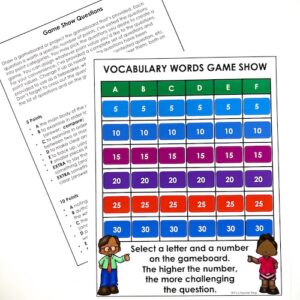
Assign point values to your questions. Those that are simple, assign 5 points and those most complex, assign 25 or 30 points. Decide how many questions you want to use. My favorites is to have 25-30 questions divided into 5-6 categories (A, B, C, D, E, and F-if needed). Within each category there are 5, 10, 15, 20, and 25 points. So in the A column you have questions A-5, A-10, A-15, A-20, and A-25. Likewise with B, C, D, E, etc. See the image below.
How to run the Jeopardy game show activity
Divide your class into groups 4-6 groups is ideal(depending on size). Each group has between 4-6 students. Ensure groups are somewhat equal with students who have a broader knowledge base of the content area. Ask each group to create a group name and to pick a number between 1-50. The closest to your chosen number goes first. From there, rotate to the right for the next turn. Write each group’s name on the board for keeping track of scoring. Find the Vocabulary Game Show Lesson here for ELA state test prep vocabulary review.
Let students know that as the numbers on the board increase so do the levels of question difficulty. Tell them 1 student per group is the spokesperson and answerer per round, but the group works together to select the question and to come up with an answer. Only the spokesperson speaks. Important: let students know that you’ll repeat the question only 2 times. When it’s another group’s turn, they must ask for the question by letter and number. They should not ask for “the question they had.” This encourages students to listen.
Scoring and using the classroom game board
If a group answers correctly, they get the points and the next team has a turn. Make it obvious that the question is no longer available by crossing it off. If the group misses the question, do not give the answer. Just say, “I’m sorry. That is incorrect.” Move on quickly.
You do not have to finish all the questions to end the game, but you do need to ensure that each group has had the same number of turns. You may also choose to continue the game the next day. When you are done, add up the team points and congratulate students. Here’s a blog post on adding Bingo as a review game to your classroom review activities.
Hacks for using game show time efficiently
Have the questions easily available for your visual. Cross a question off when it is answered correctly and add the point value to the team name on the board. Sometimes it’s difficult coming up with a 25 or 30 point question, so you can actually combine two questions into one to raise its point value.
Adding a visual game show question
You can easily have several visual questions, like a sentence that needs correcting or a picture of a key figure in history or a graph showing data, etc. Either have a few visuals written on paper to show under the projector or have a slide with the visual questions. When a student asks for a question, they don’t know there’s a visual component.
Behavior during the Jeopardy game show
Clearly lay out behavior expectations and discuss what to do if students answer incorrectly. What does behavior look like? It should be quiet when the question is asked. Students then use whisper voices to discuss the possible answer, and groups that are awaiting their turn may not whisper answers. If this happens, I either take a turn away from that team (especially if it’s been done more than once) or I delete that question and the group whose turn it is picks another question. Again, only 1 student answers (after consulting their group), which allows all students to answer.
Students can create game show questions
One strategy to use is to have students submit a list of questions for the game show. This is a great way to get students to review the material, because students can use the text to come up with questions. You don’t have to use their questions, but these make a great resource. Make sure you have your own questions as well.
Game show are ideal for reviewing so much content, and they make great Friday activities. Using hacks to move it along is key. You don’t want a game to go on and on.
Pin this post to a relevant board for later.


My students always loved anytime of review in a game format! Love Jeopardy!